Windows 10 Anniversary Update will finally be available on August 2

Microsoft has today announced that the Windows 10 Anniversary Update – the largest ever update to Windows 10 – will be available to the general public on August 2.
The blog post didn’t provide any new details other than the headline with the date date, so it’s likely it was posted earlier than intended. We’ve contacted Microsoft for more information and will update when we hear back. But given it was due to be released by the end of the summer, it doesn’t seem all that unlikely. Update: The post has been removed.
First announced at this year’s Build conference, the update includes a large suite of new tools for Windows 10 users. Perhaps chief among them is a highly revamped set of stylus tools with Windows Ink and the Ink Workspace, including improved sticky notes with Cortana support and a whiteboard and screen capture tool that you can summon from any app
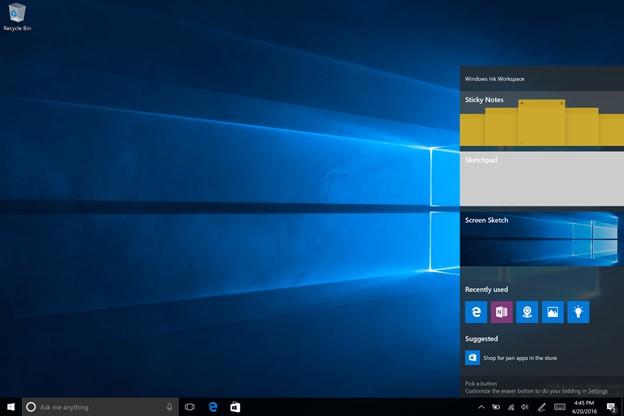
There are also a new set of API’s allowing apps to better take advantage of inking tools, including a ruler than can be programmed into any Universal Windows Platform (UWP app.
It’s also a huge update for developers thanks to running a native implementation of Ubuntu Bash, allowing Linux code to run natively right on top of Windows. For the first time, Windows has a real Unix terminal.
There are too many changes to list, but here are some notable ones:
- The start menu has gotten a cleaner, more sensible redesign.
- There’s a dark mode for all you goths
- Skype has a UWP app
- Biometric authentication (Windows Hello) can be used to sign into apps and websites
- Cortana can be augmented through apps and bots
- Cortana can send notifications from your phone (even Android ones) to your PC, Apple Continuity style. Windows {hone users can answer phone calls on their PCs
- Cortana works even when you’re logged out
- You can finally switch between virtual desktops with a single gesture (a four-finger swipe)
- Some UI refreshments and new icons
- Notifications can now include images and more detail
- Taskbar icons for UWP apps can show notification counts and other badges
- Microsoft Edge finally has support for extensions, as well as gestures for navigating back and forward
And a lot more. Windows Insiders have been beta-testing the Anniversary update since its announcement. The last couple of builds have been particularly stable so it seems Microsoft just has to work out the last few kinks now.
We’ll be going in depth with all the new features coming to the Anniversary Update as its release approaches.


Comments
Post a Comment